Complete Visibility for Your Cloud
Oracle Cloud Infrastructure Observability & Management provides a unified platform for monitoring, logging, tracing, and managing your entire cloud infrastructure. From application performance to database health, get the insights you need to deliver exceptional experiences.
The Command Center
Your unified view into the entire OCI Observability & Management Platform
OCI Observability Services
Comprehensive tools for monitoring, analysis, and management

Monitoring
Collect and visualize metrics from OCI resources with customizable dashboards and intelligent alerting.

Log Analytics
AI-powered log analysis with ML clustering, anomaly detection, and 300+ pre-built parsers for any log source.

Application Performance Monitoring
End-to-end visibility from browser to database with distributed tracing and real user monitoring.

Stack Monitoring Deprecated
Auto-discover and monitor your full application stack. Migrating to alternative solutions recommended.

Operations Insights
Analyze resource utilization, forecast capacity needs, and identify optimization opportunities across your fleet.

Database Management
Comprehensive fleet management with Performance Hub, SQL tuning advisors, and proactive problem detection.
Service Tier Comparison
Free tier vs. paid capabilities at a glance
Monitoring
Log Analytics
APM
Database Mgmt
Ops Insights
Stack Monitoring
EOL
Getting Started
Begin your observability journey in minutes
Enable Services
Navigate to the OCI Console and enable the Observability services you need. Most services are available in all OCI regions and can be enabled in minutes with just a few clicks.
Deploy Management Agents
Install the unified Management Agent on your compute instances to collect metrics, logs, and traces. The agent supports Linux, Windows, and Solaris operating systems.
Configure Data Collection
Set up log sources, enable service connectors, and configure APM instrumentation for your applications. Use pre-built integrations or create custom configurations.
Build Dashboards & Alerts
Create custom dashboards to visualize your data and set up alarms to get notified when something needs attention. Use saved searches and scheduled reports for ongoing monitoring.
Helpful Resources
OCI 2025 Observability Professional Certification
Validate your expertise with the official Oracle certification (1Z0-1111-25)
Target Audience
Site Reliability Engineers, Cloud Operations, Application Developers, Cloud Administrators, and roles involved in monitoring and troubleshooting OCI environments.
The 7 Pillars of OCI Observability
Exam objectives mapped to core competency areas
Define the Pillars of Observability
Summarize OCI Observability and Management Services portfolio and understand how they work together.
Monitor Cloud Environments
Demonstrate OCI Monitoring service with metrics and alarms. Configure alarm definitions using best practices.
Respond to Cloud Changes
Analyze OCI Events Service concepts. Determine event structure, types, rules, and integration with OCI services.
Centrally Manage Log Data
Distinguish log categories and enable log collection. Work with OCI Logging for centralized log management.
Log Analytics & Advanced Analytics
Create visualizations and identify log data patterns with OCI Logging Analytics. Use ML clustering and anomaly detection.
Application Performance Monitoring
Monitor applications with deep visibility into end-user experience using distributed tracing, RUM, and synthetics.
Monitor Distributed Components
Monitor distributed components of an application stack with full-stack observability and topology views.
End-to-End Workflow Use Cases
Real-world scenarios showcasing how OCI Observability services work together
Incident Investigation & Root Cause Analysis
From alert to resolution in minutesWhen a critical alarm fires, use OCI's integrated observability stack to quickly correlate metrics, logs, and traces to identify the root cause and reduce mean time to resolution (MTTR).
Security Monitoring & Threat Detection
Proactive security with Cloud Guard + Log AnalyticsCombine Cloud Guard's automated threat detection with Log Analytics' ML-powered anomaly detection to identify and investigate security incidents across your OCI tenancy.
Application Performance Optimization
End-to-end visibility from browser to databaseUse APM's distributed tracing combined with Real User Monitoring (RUM) to identify performance bottlenecks across your entire application stack, from frontend to backend to database.
Capacity Planning & Resource Optimization
Predict needs and optimize costs with Operations InsightsUse Operations Insights to analyze historical resource utilization patterns, forecast future capacity needs, and identify optimization opportunities across your database and compute fleet.
Kubernetes & Microservices Observability
Full-stack visibility for containerized workloadsMonitor your OKE (Oracle Container Engine for Kubernetes) clusters with comprehensive observability covering cluster health, pod metrics, application traces, and container logs.
Database Performance Troubleshooting
Deep dive into Oracle Database performanceUse Database Management's Performance Hub to analyze ASH, AWR, and real-time SQL monitoring data to identify and resolve database performance issues.
E-Business Suite Full Stack Monitoring
Complete visibility for Oracle EBS on OCIMonitor your Oracle E-Business Suite deployment end-to-end using Stack Monitoring's auto-discovery capabilities combined with Log Analytics for application and database logs.
Cost Optimization with Observability Data
Use telemetry to reduce cloud spendLeverage observability data from Operations Insights and Monitoring to identify underutilized resources, right-size infrastructure, and optimize your OCI spend.
📸 Product Capabilities Showcase
Real screenshots from OCI Observability services
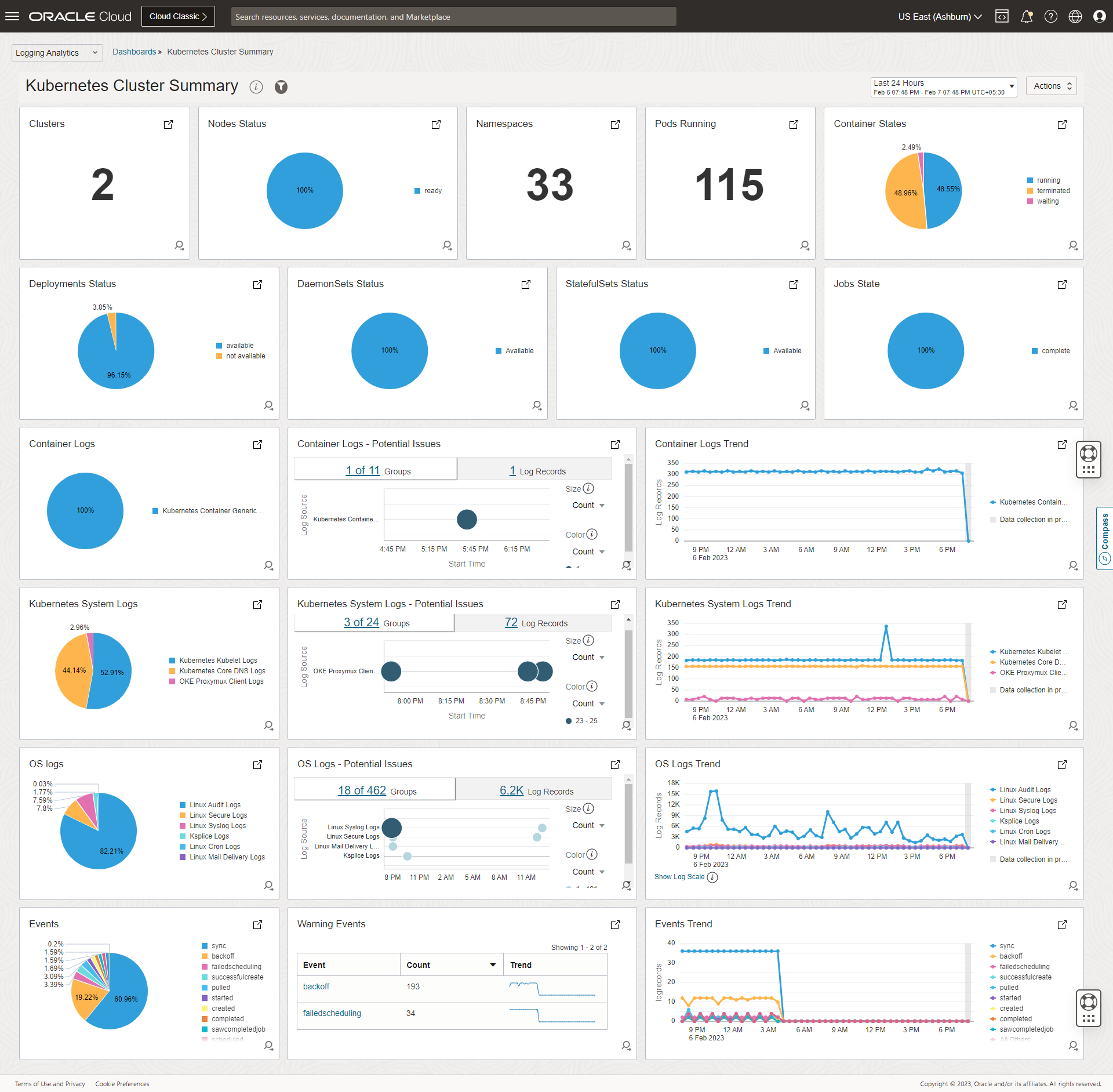
Kubernetes Cluster Summary
Comprehensive view of cluster health, resource utilization, and workload status in Log Analytics
Log Analytics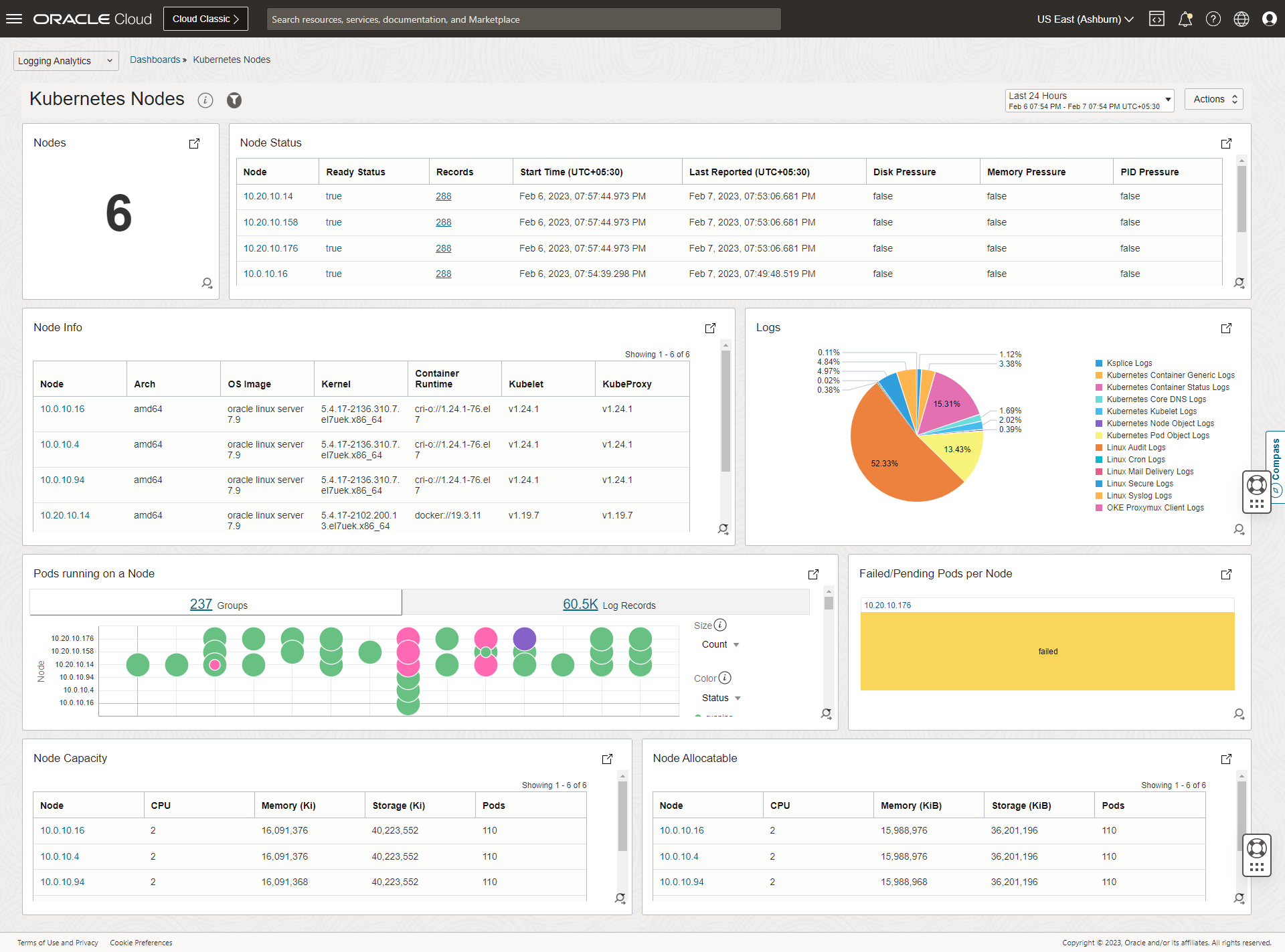
Kubernetes Nodes Dashboard
Node-level metrics including CPU, memory, disk usage, and pod distribution across the cluster
Log Analytics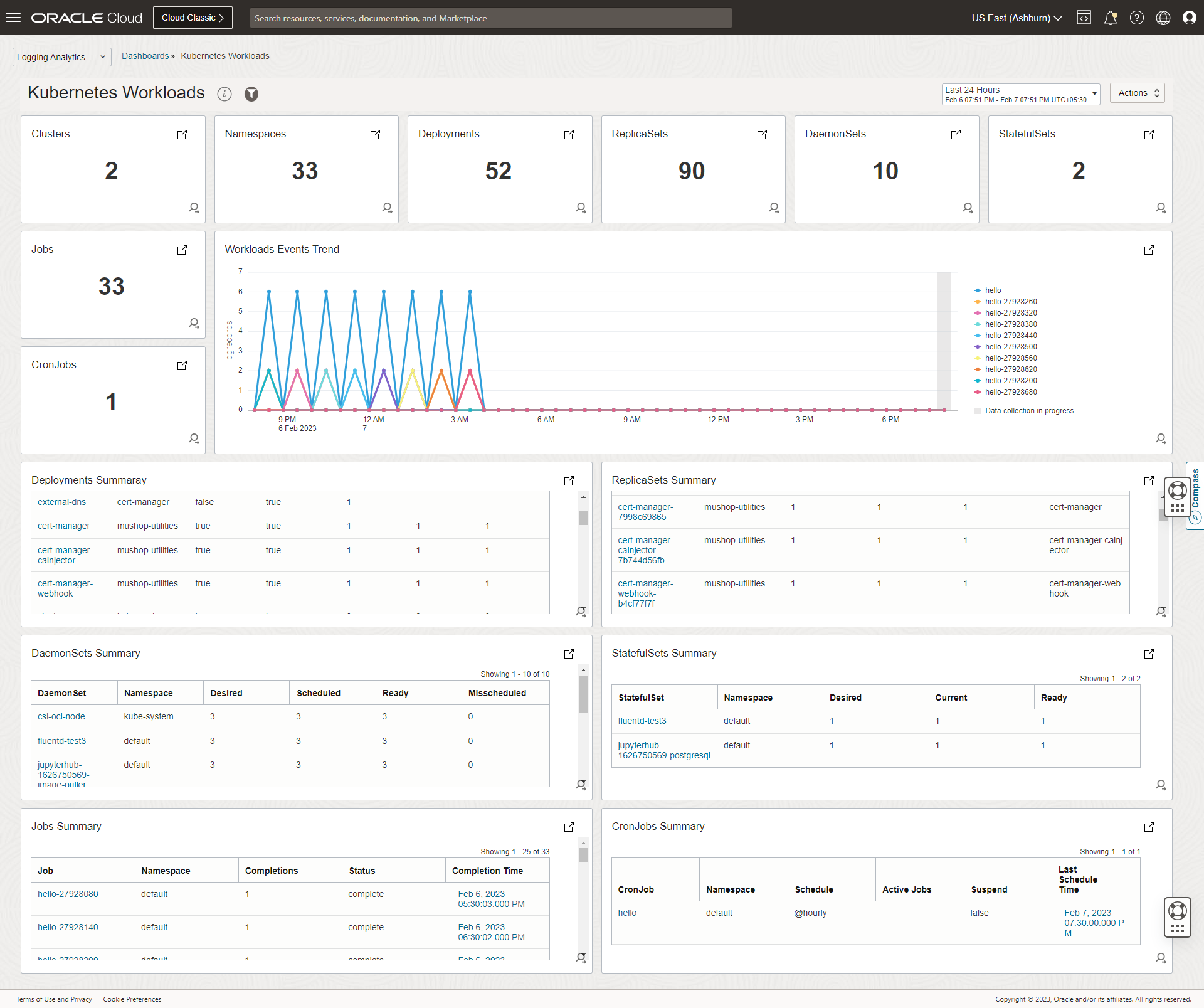
Workloads Dashboard
Deployment health, replica status, and container-level insights for all workloads
Log Analytics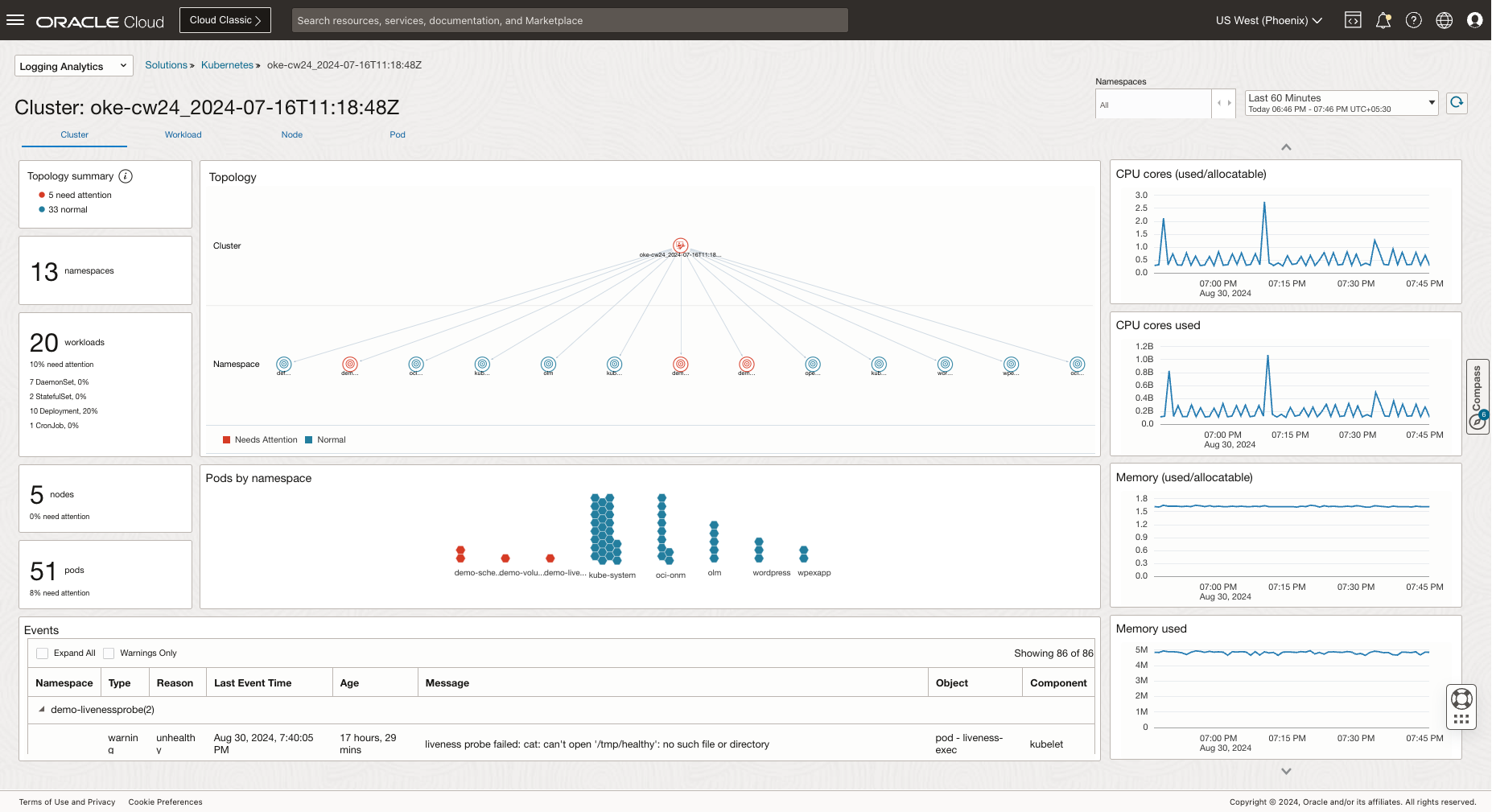
Cluster Topology View
Visual representation of cluster topology with namespaces, workloads, and services
Log Analytics🔒 Security & Compliance Use Cases
Security monitoring, threat detection, and compliance solutions
Security Operations Center (SOC)
Centralized security monitoring with Log AnalyticsBuild a cloud-native Security Operations Center using OCI Log Analytics Security Fundamentals Dashboards. Aggregate and analyze security events across your entire OCI infrastructure with pre-built threat detection rules and compliance reporting.
WAF Security Monitoring
Web Application Firewall analytics and threat intelligenceMonitor OCI Web Application Firewall traffic and security events using Log Analytics. Visualize attack patterns, blocked requests, and protection rule effectiveness with pre-built WAF dashboards.
API Gateway Monitoring
API traffic analysis and performance insightsGain deep insights into OCI API Gateway traffic patterns, latency metrics, error rates, and usage analytics. Create custom dashboards to monitor API consumers, throttling events, and backend response times.
🗄️ Oracle Database Use Cases
Comprehensive observability and security solutions for Oracle Databases
Data Safe Enabled
Free tier available, paid for non-OCI databasesOracle Data Safe provides essential security capabilities for Oracle Databases including security assessments, user assessments, data masking, activity auditing, and sensitive data discovery. Available free for OCI databases or as a paid service for on-premises and non-OCI databases.
Data Safe → Log Analytics
Unified security analysis and compliance reportingStream Data Safe audit events to Log Analytics for advanced correlation, custom dashboards, and long-term retention. Combine database security events with infrastructure logs for comprehensive security posture analysis.
Ops Insights + DB Management + Log Analytics
Complete Oracle Database observability stackAchieve comprehensive Oracle Database observability by combining Operations Insights for capacity planning and SQL analytics, Database Management for performance monitoring, and Log Analytics for alert and audit log analysis.
Oracle DB MCP Server + GenAI
AI-powered troubleshooting and daily DBA tasksLeverage the Oracle Database MCP (Model Context Protocol) server with Generative AI to enable natural language interactions for database troubleshooting, performance analysis, and automating routine DBA tasks through conversational interfaces.
Log Analytics Enterprise Platform
OS Security, Prometheus, Data Safe, Network, Fusion HCMLeverage OCI Log Analytics as a unified platform for OS security logs, Prometheus metrics ingestion, Data Safe audit events, network flow logs, and Oracle Fusion HCM application logs. Enhanced with LoganAI for intelligent analysis and Logan MCP server for 3rd party LLM integration.
APM for Oracle Fusion
Visual Builder apps and Fusion Cloud performance monitoringMonitor Oracle Fusion Cloud applications including Visual Builder apps with OCI Application Performance Monitoring. Gain end-to-end visibility into user experience, transaction traces, and backend performance for your Fusion deployments.
Log Analytics for OIC
Oracle Integration Cloud monitoring and troubleshootingMonitor Oracle Integration Cloud (OIC) flows, connections, and errors using Log Analytics. Collect integration activity logs, track message flows, and create dashboards for integration health and performance analysis.
OCI Monitoring Query Builder
Build and execute metrics queries with dynamic namespace and region selection
No queries yet
Add a query and click "Run Query" to visualize metrics
Common Metric Namespaces
Quick reference for OCI metric namespaces
Compute
oci_computeagent- Agent-collected metricsoci_compute_infrastructure_health- Instance health
Database
oci_autonomous_database- ADB metricsoci_database- Base DB metricsoci_mysql_database- MySQL HeatWave
Networking
oci_vcn- VCN flow metricsoci_lbaas- Load Balanceroci_service_gateway- Service Gateway
Storage
oci_objectstorage- Object Storageoci_blockstore- Block Volumeoci_filestorage- File Storage
EBS Observability
Complete monitoring for Oracle E-Business Suite on OCI
Integrated Observability Stack
Stack Monitoring
Auto-discover and monitor the complete EBS stack with pre-built dashboards
Log Analytics
Collect and analyze EBS application logs, concurrent manager logs, and database alert logs
APM for EBS
End-to-end transaction tracing from browser to database with RUEI integration
Database Management
Performance Hub, SQL Tuning, and fleet-wide database management
Try the LiveLabs Workshop
Hands-on experience with EBS Observability using OCI Stack Monitoring and Log Analytics
Launch WorkshopThe Connected Enterprise
Observability for Oracle Fusion Applications and Integration Cloud
Order-to-Cash Flow Visualization
Root Cause Identified: Order #ORD-2024-78432 failed at OIC integration due to malformed JSON payload (missing "shipping_address" field).
ERROR [IntegrationFlow] OrderSync: ValidationException - Required field 'shipping_address' is null for order ORD-2024-78432
User Activity Timeline
Correlated Evidence
ESS Job Schedule Heatmap
Job Details: BIP_FINANCIAL_CLOSE_REPORT
[2024-01-31 02:34:17] BIP_REPORT: Waiting for input file...
[2024-01-31 02:34:17] OIC_FTP_ADAPTER: Connection timeout to ftp.partner-bank.com:21
[2024-01-31 02:34:17] OIC_FTP_ADAPTER: Retry 1/3 failed
[2024-01-31 02:34:47] OIC_FTP_ADAPTER: Retry 2/3 failed
[2024-01-31 02:35:17] OIC_FTP_ADAPTER: Retry 3/3 failed - giving up
One Tool to Rule Them All
AI-powered log analysis for any source, any format, any scale
Cluster: CrashLoopBackOff (847 records)
Back-off restarting failed container * in pod *
These CrashLoopBackOff errors correlate with a memory limit increase deployed at 14:15. Consider reverting the change or increasing pod memory limits.
ML-Powered Clustering
Automatically group similar log patterns without manual regex
Anomaly Detection
Spot unusual patterns and deviations from baseline behavior
Natural Language Queries
Ask questions in plain English, get actionable results
300+ Pre-built Parsers
Out-of-the-box support for OCI, Linux, databases, and more
AI-Powered Log Intelligence
LoganAI enables you to analyze logs using AI for faster investigation and troubleshooting.
AI-Powered Summarization
Get concise summaries of large log datasets in plain language, dramatically reducing time-to-insight.
Actionable Follow-up Questions
AI suggests relevant follow-up queries based on your current investigation context.
User-Friendly Explanations
Complex log patterns explained in simple terms for faster understanding.
Correlation & Context
Automatically correlate related events across multiple log sources.
ML Analysis Capabilities
Unsupervised ML automatically categorizes logs into actionable insights
Clusters automatically identified as potential problems requiring attention
One-time events that indicate anomalies in the system
Cluster patterns correlated in time showing emerging issues
Log Analytics Use Cases
Security Investigation
Correlate audit logs, VCN flow logs, and application logs to investigate security incidents.
Application Debugging
Use ML clustering to identify error patterns across distributed microservices.
Compliance Reporting
Generate compliance reports from centralized log data with scheduled searches.
Performance Analysis
Analyze application and infrastructure logs to identify performance bottlenecks.
The Digital Experience
End-to-end visibility from browser click to database query
"The Spinning Wheel of Death"
Users complain checkout is slow, but server CPU is only 20%
"It works on my machine"
Devs can't reproduce errors that users in Brazil are seeing
Real User Monitoring - Global View
Configure RUMBrazil - Performance Analysis
Issue: JavaScript Error on Checkout Button
Uncaught TypeError: Cannot read property 'submit' of undefined at checkout.min.js:847
This client-side error affects 73% of Brazilian users due to a CDN caching issue with the new checkout script.
Custom Attributes for RUM
Enrich your Real User Monitoring data with custom dimensions and metrics for deeper analysis.
Text Attributes (Dimensions)
Filter and group by user properties, page categories, or custom tags
window.apmrum.udfAttributes = [
  { name: 'userId', value: 'user@example.com' },
  { name: 'pageCategory', value: 'checkout' }
];
Numeric Attributes (Metrics)
Aggregate and alert on custom numeric values like cart totals or item counts
window.apmrum.udfAttributes = [
  { name: 'cartTotal', value: 149.99 },
  { name: 'itemCount', value: 3 }
];
Dynamic Attributes (Functions)
Execute functions on each span to capture real-time state
window.apmrum.udfAttributes = [
  { name: 'cartItems', value: () => getCartCount() }
];
Attribute Limits
Distributed Tracing - Transaction Waterfall
Root Cause: The slowness is caused by the 3rd party payment provider, not your code. The Payment Gateway service is taking 3 seconds to respond.
Synthetic Monitoring - Availability Monitoring
DocumentationProactively detect availability and performance issues before end users experience them using 8 different monitor types.
Browser
Monitor specific URLs and page load times
Scripted Browser
Record and replay user journeys with multi-step transactions
REST API
Test REST endpoints with custom headers and payloads
Network
Monitor server/host availability via ping and port checks
DNS
DNS Server, DNS Trace, and DNSSEC validation
SQL
Measure SQL query performance against Oracle databases
FTP
Measure FTP operation performance and latency
Scripted REST
Multi-step API transaction workflows
Global Vantage Points - Live Status
Scripted browser runs login test every 5 minutes from global vantage points. Failures trigger immediate alerts.
Code-Level Diagnostics
SELECT * FROM payment_tokens WHERE user_id = ? AND status = 'ACTIVE' ORDER BY created_at DESC LIMIT 1
Execution: 2847ms
APM Data Sources & Integrations
View All SourcesCollect traces and metrics from multiple sources including language agents, open standards, and APIs.
OCI APM Agents
Open Standards
Additional Sources
APM Use Cases
Root Cause Analysis
Drill down from slow page loads to the exact database query or API call causing issues.
Geographic Performance
Identify regional performance disparities with RUM and optimize CDN configuration.
Proactive Monitoring
Detect outages before users report them with synthetic monitors running 24/7.
Release Validation
Compare performance metrics before and after deployments to catch regressions.
Microservices Debugging
Trace requests across dozens of services with distributed tracing and service maps.
SLA Monitoring
Track response times and error rates against SLA commitments with custom dashboards.
Operations Insights
Gain deep visibility into your database and host fleet performance. Operations Insights provides capacity planning, resource utilization analysis, and SQL analytics to help you optimize costs and ensure performance.
Operations Insights
Capacity planning and resource analytics for databases and hosts
Capacity Planning
Forecast CPU, memory, and storage needs up to 30 days ahead with ML-powered predictions.
SQL Warehouse
Analyze SQL execution patterns across your entire database fleet in a centralized repository.
Exadata Insights
Deep visibility into Exadata systems including storage, compute, and network performance.
Host Insights
Monitor compute resource utilization patterns across your infrastructure fleet.
Resource Utilization Dashboards
Visualize CPU, memory, I/O and storage utilization trends across your database and host fleet.
Demand Forecasting
Predict future resource requirements using machine learning based on historical patterns.
SQL Analytics
Identify problematic SQL statements and optimization opportunities across your database fleet.
AWR Hub
Consolidate AWR data from multiple databases for centralized performance analysis.
Capacity Planning Dashboard
SQL Warehouse
Centralized SQL analysis across your entire database fleet - identify problematic queries and optimization opportunities.
| SQL ID | Database | Avg Elapsed (ms) | Executions | CPU Impact |
|---|---|---|---|---|
| 9xkz4wm7c2n3p | PROD_ERP_01 | 4,523 | 12,847 | |
| 7fnh2kp9v4m8q | PROD_CRM_02 | 2,891 | 8,234 | |
| 3bmr6yt1x9k2w | PROD_HR_01 | 1,756 | 24,891 |
Exadata Insights
Storage Server
Compute Node
InfiniBand Network
Pro Tip: Enable OPSI for Cost Optimization
Operations Insights can help identify underutilized resources and right-sizing opportunities, potentially saving significant infrastructure costs. Enable it on your production databases to get actionable recommendations.
Database Management
Monitor and manage your Oracle Database fleet with a unified cloud service. Get Performance Hub diagnostics, automated tuning recommendations, and proactive alerting for your on-premises and cloud databases.
Database Management
Unified monitoring and management for your Oracle Database fleet
Performance Hub
Real-time and historical performance analysis with ASH, AWR, and SQL monitoring in one place.
Fleet Summary
Single pane of glass view across all your managed databases with health status and alerts.
SQL Tuning
Get automated SQL tuning recommendations and implement fixes with a single click.
Job Scheduling
Schedule and monitor database jobs across your fleet with centralized management.
Managed Database Groups
Organize databases into logical groups for easier management and bulk operations.
Proactive Alerting
Get notified about performance issues, space problems, and security concerns before they impact users.
Tablespace Management
Monitor tablespace usage and get recommendations for optimization and space reclamation.
Optimizer Statistics
Manage optimizer statistics gathering and staleness across your database fleet.
Supported Database Types
Database Management supports Oracle Autonomous Databases, Base DB Systems, Exadata Cloud Service, and on-premises Oracle Databases (11g, 12c, 18c, 19c, 21c, 23ai). Connect on-premises databases using Management Gateway or direct registration.
Performance Hub
DB CPU
User I/O
Application Wait
Concurrency
SQL Tuning Advisor
Automated recommendations to optimize SQL performance based on execution analysis.
Create Index on ORDERS.CUSTOMER_ID
SQL ID: 7fnh2kp9v4m8q performs full table scan on ORDERS. Creating an index would reduce execution time by ~85%.
↓ 85% Response TimeSQL Profile Available
SQL ID: 3bmr6yt1x9k2w has a suboptimal execution plan. Accepting the SQL Profile would improve cardinality estimates.
↓ 62% CPU UsageGather Statistics on INVENTORY
Table INVENTORY has stale statistics (last gathered 45 days ago). Fresh statistics would improve optimizer decisions.
↓ 40% Plan ChangesFleet Overview
PROD_ERP_01
HealthyPROD_CRM_02
WarningPROD_HR_01
HealthyDEV_TEST_01
CriticalAWR Management
Automatic Workload Repository for historical performance analysis and diagnostics.
Snapshot Management
Automatic snapshots every 30 minutes with 8-day retention. Configure custom intervals and retention periods.
AWR Reports
Generate HTML/text AWR reports for any time range. Compare periods to identify performance changes.
ASH Analytics
Active Session History analysis for real-time and historical session activity visualization.
The Future Interface
Conversational observability powered by OCI GenAI and MCP
This is a demonstration with pre-built responses showcasing real-world troubleshooting scenarios. The examples below represent actual use cases that can be implemented using OCI GenAI and MCP servers for your observability workflows.
Real-World Troubleshooting Scenarios
These examples demonstrate how AI-powered observability can accelerate incident resolution across different OCI services.
AI Analysis: Detected 3 SQL statements consuming 78% of DB time. Top offender: SELECT * FROM ORDERS WHERE status='pending' - missing index on status column. AWR shows buffer cache hit ratio dropped to 67%.
Recommended Actions: Create index on ORDERS(status), increase SGA_TARGET, consider query rewrite with pagination.
AI Analysis: Detected 2,847 failed SSH attempts across 12 hosts. 94% originated from 3 IP ranges (185.x.x.x, 45.x.x.x, 91.x.x.x). Peak activity: 03:00-05:00 UTC. Target: root account (89%), admin (11%).
Recommended Actions: Block identified IP ranges via NSG, enforce key-based auth, consider fail2ban or Cloud Guard responder.
AI Analysis: Trace analysis shows /api/checkout avg response time: 12.4s (SLA: 2s). Root cause: payment-service → external-gateway call timing out. 3rd party API latency increased from 200ms to 8s starting 14:30 UTC.
Recommended Actions: Implement circuit breaker pattern, add timeout with fallback, contact payment provider about degradation.
AI Analysis: Pods in prod/api-deployment restarted 47 times in 2 hours. Cause: OOMKilled (memory limit 512Mi, actual usage peaks at 680Mi). Memory leak pattern detected in heap dumps correlating with connection pool growth.
Recommended Actions: Increase memory limit to 1Gi, investigate connection pool leak in API service, enable HPA for automatic scaling.
AI Analysis: VCN Flow Logs show REJECT for TCP/1521 from subnet-app (10.0.1.0/24) to subnet-db (10.0.2.0/24). Security List sl-app-subnet missing egress rule for DB port. Change made by user@example.com at 09:15 UTC.
Recommended Actions: Add egress rule to sl-app-subnet allowing TCP/1521 to 10.0.2.0/24, or use NSG for more granular control.
AI Analysis: ESS job PYUGEN failed for 3 consecutive runs. Error: "Unable to acquire lock on PAY_PAYROLL_ACTIONS". Concurrent job ARCHIVE_PAYMENTS holding lock for 4+ hours. Data volume increased 340% due to new hire batch.
Recommended Actions: Terminate stuck archive job, increase UCM storage allocation, schedule archive jobs during off-peak, partition payroll tables by period.
AI Analysis: Integration SYNC_ORDERS_TO_ERP failed 156 times today. 89% timeout on REST invoke to on-prem endpoint. Network latency to FastConnect increased from 15ms to 890ms. BGP route flapping detected on customer edge router.
Recommended Actions: Check FastConnect partner status, increase OIC connection timeout to 120s, implement async pattern with callback for large payloads.
AI Analysis: Anomaly detected: User APP_SERVICE exported 2.3M rows from CUSTOMERS table at 02:14 UTC (normal: <1000 rows/day). Same user accessed 47 tables in HR schema they never accessed before. Login from new IP: 203.x.x.x (geolocation: unexpected country).
Recommended Actions: Immediately revoke APP_SERVICE credentials, review exported data scope, enable Data Safe SQL Firewall, investigate compromised credentials source.
Model Context Protocol (MCP) Integration
Connect your AI assistant to live OCI data through secure, standardized protocols.
Log Analytics MCP
Query logs, run ML analysis, detect anomalies
logan_execute_query
logan_detect_anomalies
Database Observatory MCP
AWR reports, SQL tuning, performance analysis
get_awr_report
analyze_sql
Security MCP
Cloud Guard problems, vulnerability scans
list_problems
get_security_score
OCI Core MCP
Compute, networking, observability metrics
list_instances
get_metrics